
Amazon Associate Disclosure: As an Amazon Associate, I earn from qualifying purchases. If you buy through an affiliate link on this page, I may receive a commission at no extra cost to you.
A senior who doesn’t use a smartphone needs a very different kind of fitness tracker. The key features are a large readable screen, simple controls, on-watch activity tracking, heart-rate readings, and—when safety is the priority—an independent cellular connection for SOS and fall alerts.
The biggest catch is that most mainstream fitness trackers still depend on a phone for setup, syncing, or emergency communication. Garmin’s vívofit 4, for example, can display limited information without a smartphone, but Garmin says additional features require setup through a smartphone or computer.
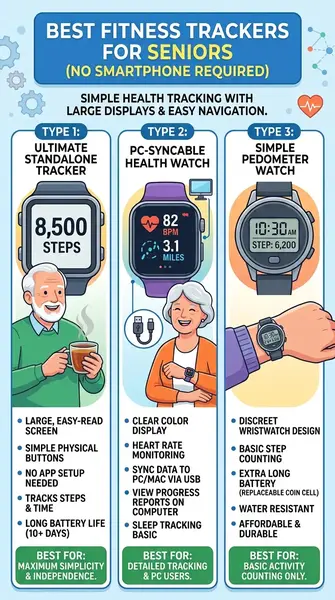
For completely phone-free use, the market splits into two groups: simple standalone fitness/pedometer watches and cellular medical-alert watches. They serve different purposes.
Table of Contents
Quick Comparison: Fitness Trackers for Seniors Without Smartphone
| Device type / model | Smartphone needed for basic use? | Large display | Heart rate | Fall/SOS | Best use |
|---|---|---|---|---|---|
| Standalone senior pedometer watch | No | Yes | Usually | Usually no | Steps and basic health |
| DAVIKO/Pautios-style standalone watch | No | Yes | Yes | No | Simple daily tracking |
| Medical Guardian MGMove | No | Yes | Limited fitness focus | SOS | Emergency protection |
| LifeFone Safe Watch Active | No | Yes | Yes | Optional | Health + emergency response |
| Bay Alarm Medical SOS All-In-One 2 | No | Wearable device | Not primarily a fitness tracker | Optional | Fall detection + emergency help |
| Garmin vívofit 4 | Limited | Small | No | No | Basic activity tracking |
The distinction matters. A cheap standalone watch can count steps without a phone, but it generally won’t provide the professionally monitored emergency service offered by a cellular medical-alert watch.
What Is the Best Fitness Tracker for a Senior Without a Smartphone?
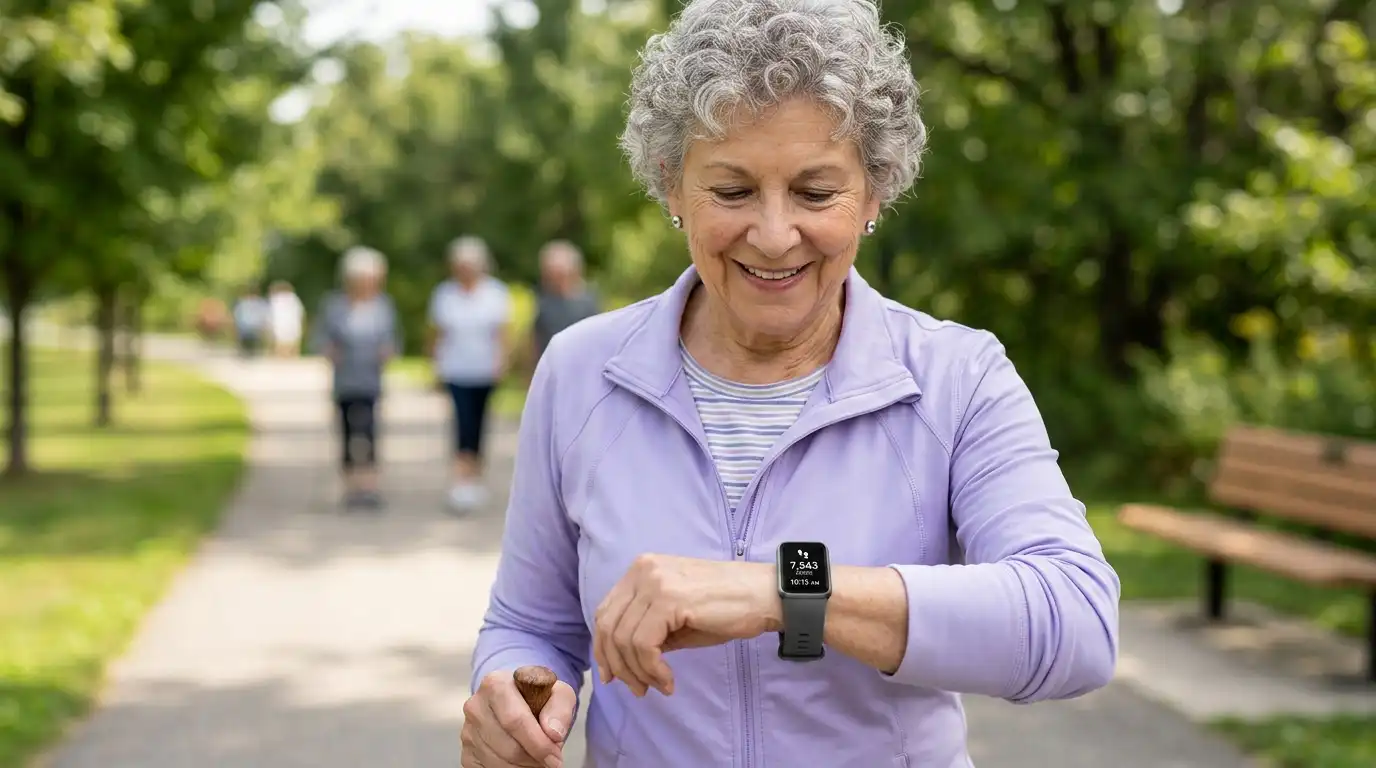
For basic fitness tracking, a standalone pedometer watch with a large display is the simplest solution. Several current models are designed to show steps, distance, calories, heart rate, sleep information and, in some cases, blood-oxygen readings directly on the watch without requiring a phone.
For fall detection and emergency assistance, a cellular medical-alert watch makes more sense. Medical Guardian’s MGMove, for example, has its own 4G LTE connection and can connect directly to emergency operators without a smartphone.
For a senior living alone, that difference can be more important than the number of fitness metrics on the screen.
1. Standalone Senior Pedometer Watches
A standalone pedometer watch is the closest match to the phrase “fitness tracker without a smartphone.”
These watches can operate independently, displaying information directly on the wrist. Current models sold under various brands include large color screens, step counting, heart-rate monitoring, sleep tracking and manual SpO2 readings. Some store several days of information locally before synchronization is ever needed.
Typical specifications
- Large 1.4–1.85-inch display
- Step counter
- Distance and calorie estimates
- Heart-rate monitoring
- Manual blood-oxygen readings on some models
- Sleep tracking
- Stopwatch and alarms
- Approximately 7-day battery claims on many models
- Water resistance varies by model
- No smartphone required for basic tracking
Pros
- Large numbers are easier to read.
- Basic activity information stays on the wrist.
- No phone notifications to distract the wearer.
- Simple watches can be much less intimidating for older adults.
- Battery life is generally longer than a full smartwatch.
Cons
- Quality varies widely between inexpensive brands.
- Health measurements shouldn’t be treated as medical diagnoses.
- Most don’t provide genuine automatic fall detection.
- Warranty and software support can be less predictable than with major brands.
Who it’s for
This type of watch suits a senior who mainly wants to count steps, check heart rate, monitor daily activity and see the time without carrying a phone.
Who should skip it
Skip a basic pedometer watch when automatic emergency assistance or professional monitoring is the main requirement.
Several current standalone models are marketed specifically around no-app/no-phone operation, including watches with large screens and heart-rate tracking.
2. Medical Guardian MGMove
The Medical Guardian MGMove belongs in this article because it solves the part of the problem that ordinary fitness trackers usually can’t: emergency communication without a smartphone.
Medical Guardian states that the MGMove has built-in 4G LTE, allowing the watch to connect directly to emergency operators. Its basic service does not require a smartphone.
The watch is therefore better viewed as a medical-alert smartwatch with activity features, rather than a traditional fitness tracker.
What it offers
- Built-in 4G LTE
- Emergency assistance from the wrist
- Two-way communication
- Watch-based controls
- Optional additional apps and services
- No smartphone required for the basic plan
Pros
- Works independently from a smartphone.
- Direct connection to emergency operators.
- Designed around senior safety.
- Voice communication happens through the watch.
Cons
- It’s a medical-alert service rather than a simple fitness tracker.
- Subscription service is required.
- Fitness features aren’t its main purpose.
- More expensive over time than a basic pedometer.
Who it’s for
It’s suited to a senior who doesn’t own a smartphone and needs reliable access to emergency assistance.
Who should skip it
Someone who simply wants a cheap step counter probably doesn’t need a monitored medical-alert service.
3. LifeFone Safe Watch Active
The LifeFone Safe Watch Active is another interesting option for seniors who want fitness information and emergency protection in one wrist-worn device.
LifeFone says the watch uses its own AT&T LTE cellular service, so the wearer doesn’t need a personal phone service. It provides emergency assistance, heart-rate monitoring, step tracking, GPS/location technology and an optional fall-detection service.
Key specifications
- Large watch face
- LTE cellular connection
- GPS, Wi-Fi and cellular location technology
- Heart-rate monitoring
- Step tracking
- Two-way voice communication
- Optional automatic fall detection
- Water resistance
- Up to about 24 hours of battery life in the specified monitoring configuration
LifeFone warns that fall detection cannot identify every fall, and adding fall detection can reduce battery life.
Pros
- No smartphone required.
- Combines activity tracking with emergency assistance.
- Heart rate and steps are available.
- Two-way voice communication.
- Optional fall detection.
Cons
- Battery life is much shorter than that of a simple fitness band.
- Requires a service subscription.
- Cellular coverage affects performance.
- It’s primarily a medical-alert product.
Who it’s for
This is a strong fit for an older adult who wants a watch rather than a traditional emergency pendant, while still having access to professional help.
Who should skip it
It’s unnecessary for someone who only wants step counting and basic wellness information.
LifeFone specifically says its service operates through its own cellular connection and doesn’t require a phone service at home.
4. Bay Alarm Medical SOS All-In-One 2
The Bay Alarm Medical SOS All-In-One 2 takes a slightly different approach. It’s a compact wearable medical-alert device rather than a conventional fitness smartwatch.
It has built-in 4G LTE, two-way communication, GPS and Wi-Fi positioning, and optional automatic fall detection. Bay Alarm Medical says the device can connect to its monitoring station after a detected fall without the wearer pressing the help button.
Pros
- No smartphone required.
- Built-in cellular connectivity.
- Two-way voice communication.
- GPS and indoor positioning technology.
- Optional automatic fall detection.
- Designed for use at home and away from home.
Cons
- Fitness tracking isn’t its main function.
- It isn’t a conventional smartwatch.
- Requires a monitoring service.
- Charging is part of the routine.
Who it’s for
Choose this category when personal safety is more important than fitness statistics.
Who should skip it
A senior who simply wants steps, calories and heart rate may find a standalone fitness watch more suitable.
5. Garmin vívofit 4
The Garmin vívofit 4 is worth mentioning because it shows why the phrase “works without a smartphone” needs careful reading.
Garmin documents a limited no-smartphone mode. Before completing setup, the device can show step count, an automatic goal and a movement bar. Garmin also says additional functions require setup using a smartphone or computer.
So it’s useful for basic activity tracking, but it doesn’t satisfy the full “no phone ever” requirement as cleanly as a true standalone watch.
Pros
- Very simple activity display.
- Long battery design.
- Physical button.
- Good choice for basic step tracking.
- Garmin’s established ecosystem.
Cons
- Limited functionality without setup.
- No heart-rate sensor.
- No fall detection.
- Advanced data requires Garmin Connect.
Who it’s for
A senior whose caregiver can handle the initial setup on a computer and who mainly wants a simple step tracker.
Who should skip it
Skip it if the watch must provide heart-rate monitoring, emergency communication or complete phone-free functionality.
Why Fall Detection Changes the Buying Decision
Fall detection sounds like a fitness feature, but it belongs in the safety category.
A basic activity watch can tell you that you’ve walked 4,000 steps. A medical-alert watch can potentially connect you with help after a fall.
Those are very different jobs.
Apple and Samsung watches offer sophisticated fall-detection systems, but mainstream smartwatch safety features often depend on a compatible smartphone or ecosystem. Current senior-wearable comparisons continue to show this phone dependency as a major limitation for people who don’t carry smartphones.
A dedicated cellular medical-alert watch removes that dependency.
What to look for
If fall detection is essential, check for:
- Built-in cellular connectivity
- Two-way voice communication
- Automatic fall detection
- Manual SOS button
- GPS/location support
- Professional monitoring or emergency-contact alerts
- Battery life that fits the senior’s routine
- Water resistance for bathroom use
No fall-detection system catches every fall. LifeFone explicitly warns users to press the help button whenever possible during an emergency.
Large Screens Matter More Than Most Fitness Metrics
For an older adult, a screen that can be read comfortably may be more useful than dozens of advanced workout statistics.
Look for:
- Large digits
- High contrast
- Bright backlight
- Simple menus
- Physical buttons when possible
- Large touch targets
- Minimal notification clutter
- Easy-to-understand icons
A 1.8-inch screen with large numbers can make a cheap standalone tracker far easier to use than a technically superior device filled with tiny menus.
Some current no-phone watches specifically advertise screens around 1.8 inches with larger fonts for senior users.
Heart Rate Monitoring Without a Smartphone
Heart-rate monitoring can work directly on some standalone watches.
Several current no-app/no-phone models advertise on-watch heart-rate readings and manual blood-oxygen measurements.
Use these numbers as wellness information, rather than assuming they provide the same accuracy or clinical interpretation as medical equipment.
For a senior, the useful routine may be simple:
- Check resting heart rate in the morning.
- Record unusual changes.
- Look at trends rather than one isolated reading.
- Discuss persistent concerns with a healthcare professional.
A fitness tracker can support that routine, but it doesn’t replace professional medical assessment.
How Much Battery Life Does a Senior Really Need?
Battery life is part of usability.
A watch that needs charging every night creates another task to remember. A basic standalone fitness watch may last roughly a week, while medical-alert watches with active cellular communication can require much more frequent charging. LifeFone, for example, lists up to 24 hours for the Safe Watch Active configuration.
For someone who frequently forgets to charge devices, I’d look for:
- 7+ days: excellent for basic fitness tracking
- 3–6 days: manageable
- 1–2 days: requires a fixed charging habit
- Around 24 hours: best suited to users who can reliably charge every day
A simple routine helps. Charge the watch at the same time every day, preferably during a period when the senior isn’t walking around alone.
Fitness Trackers for Seniors or Medical Alert Watch?
Use this quick decision guide.
Choose a standalone fitness watch if:
- The goal is counting steps.
- Heart-rate information is useful.
- The senior doesn’t want a smartphone.
- No emergency monitoring is needed.
- A large display is the main priority.
- Keeping costs low matters.
Choose a cellular medical-alert watch if:
- The senior lives alone.
- Falls are a concern.
- Emergency assistance is important.
- The wearer won’t carry a phone.
- Two-way voice communication is needed.
- Caregivers want location or emergency notifications.
The most important buying mistake is expecting a basic fitness watch to provide the emergency protection of a monitored medical-alert device.
Common Mistakes When Buying a Fitness Trackers for Seniors Without Smartphone
Assuming Bluetooth means standalone
A watch may display steps without a phone while still requiring a phone for setup, history, updates or safety functions.
Check the manufacturer’s documentation before buying.
Assuming heart-rate monitoring means medical monitoring
A wrist sensor can provide useful readings, but consumer fitness trackers aren’t automatically medical devices.
Buying fall detection without checking connectivity
A fall sensor is only part of the system. Find out exactly who receives the alert and how the alert leaves the watch.
Ignoring battery life
A dead watch provides no tracking or safety benefit.
Choosing a tiny display
Small screens can become frustrating when reading requires glasses or precise finger movements.
Confusing SOS with automatic fall detection
An SOS button requires the wearer to press it.
Automatic fall detection attempts to recognize a fall without that action. They’re separate features, and having both is preferable when safety is a major concern.
Key Takeaways
- Standalone pedometer watches are the simplest choice for seniors who want steps and basic health information without a smartphone.
- Look for a large, readable display before worrying about advanced fitness statistics.
- Some no-phone watches provide heart-rate and SpO2 readings directly on the wrist.
- Fall detection requires a different level of device than ordinary step tracking.
- Cellular medical-alert watches such as Medical Guardian MGMove can operate without a smartphone.
- LifeFone Safe Watch Active combines cellular emergency assistance, heart-rate monitoring and step tracking, with optional fall detection.
- Battery life matters because a forgotten charge can leave a wearable unavailable.
- Treat consumer heart-rate, SpO2 and fall-detection features as wellness and safety tools, not guarantees of medical protection.
Frequently Asked Questions
Can a fitness tracker work without a smartphone?
Yes. Some standalone pedometer watches can count steps and provide basic health readings directly on the watch without a smartphone. Many mainstream fitness trackers still require a phone for setup, synchronization or advanced features.
What is the easiest fitness tracker for a senior without a smartphone?
A standalone pedometer watch with a large display and physical controls is generally the simplest type. It can show steps and other basic information directly on the wrist without requiring an app.
Can a senior get fall detection without a smartphone?
Yes. Cellular medical-alert watches can provide fall detection and emergency communication without a personal smartphone. Medical Guardian’s MGMove, for example, uses built-in 4G LTE for its basic emergency service.
Do fitness trackers work without Wi-Fi?
Basic tracking can work without Wi-Fi on many devices. A standalone watch can store information locally. Emergency communication and location services on cellular medical-alert watches depend on cellular coverage and the specific service.
What is the best watch for an elderly person living alone?
The answer depends on whether the main need is fitness tracking or emergency protection. For steps and basic health information, a standalone fitness watch is appropriate. For emergency assistance and fall detection, a cellular medical-alert watch is the more relevant category.
Can a fitness tracker detect a fall?
Some smartwatches and medical-alert wearables have fall detection. Many basic fitness bands do not. A standalone pedometer watch should not be assumed to have fall detection simply because it measures activity.
Do seniors need a smartwatch to track steps?
No. A basic pedometer watch can count steps without a smartphone, subscription or smartwatch ecosystem.
Can heart rate be monitored without a phone?
Yes. Some standalone watches contain optical heart-rate sensors and can display readings directly on the watch. The accuracy and medical usefulness vary by device.